

Looksy: Advanced Search Engine Queries Made Easy
06/01/2026 • 00:04:00
Project Reference
This article relates to a project in our portfolio.
Mastering the Web with Looksy: The Pro Search Tool You Didn't Know You Needed
Have you ever spent twenty minutes scrolling through Google results, only to realize the answer you need is buried under a mountain of SEO-optimized fluff, "sponsored" ads, and irrelevant retail links?
While Google is the world's most powerful search engine, most of us only use about 5% of its actual power. Beneath the simple search bar lies a complex language of search operators—logic gates that can filter by date range, file type, specific URLs, and exact phrases.
The problem? Nobody wants to memorize code just to find a PDF menu for a local restaurant or a specific Reddit thread from three years ago.
Enter Looksy.
What is Looksy?
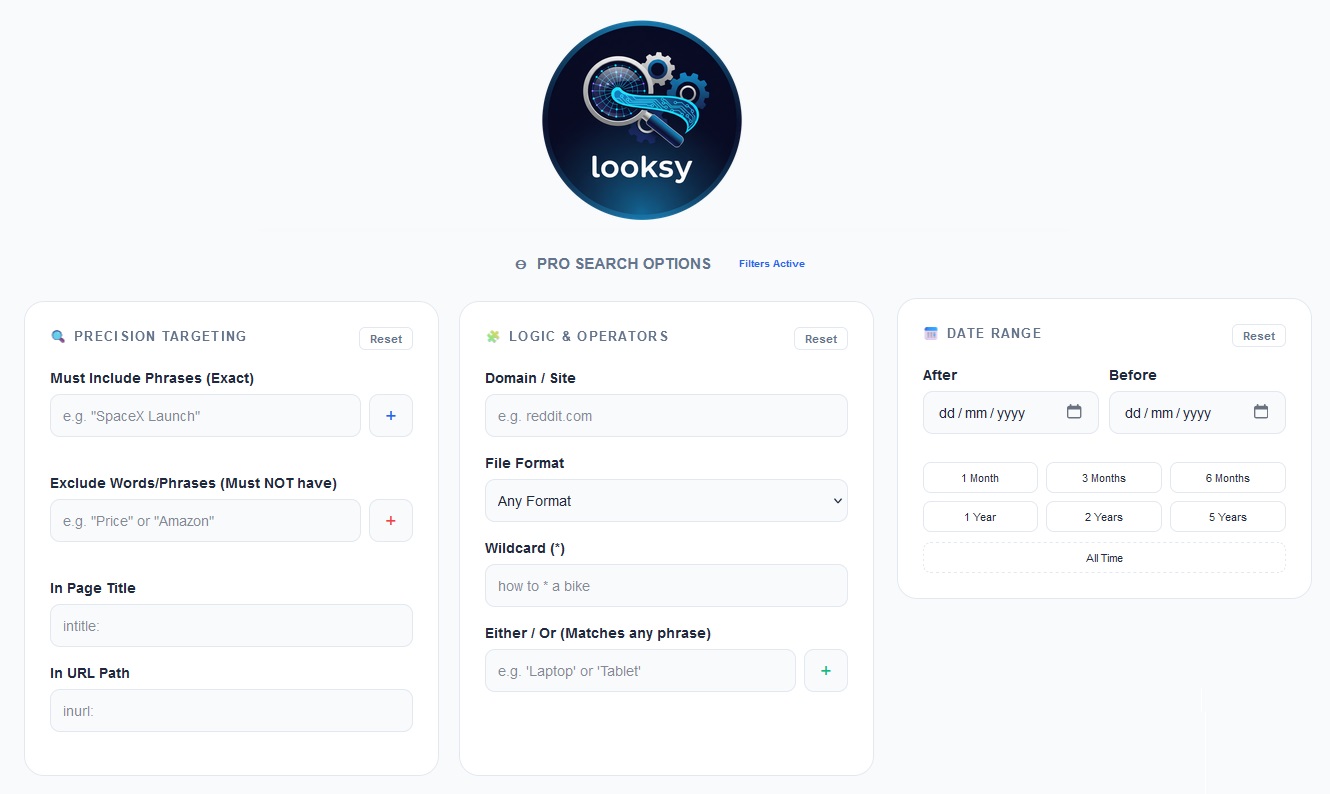
Looksy is a "forwarded search" interface that acts as a visual builder for Google’s most advanced features. Instead of typing complex strings like site:reddit.com "mechanical keyboard" -price after:2024-01-01, you simply fill out a few intuitive fields.
Looksy builds the "Search Dork" for you in real-time and forwards it to Google with a single click. It’s designed for researchers, power users, and anyone tired of "close enough" results.
The Power of Precision
Looksy exposes several "hidden" parameters that transform how you interact with the web:
1. Precision Targeting
Standard searches often give you "relevant-ish" results. Looksy’s Must Include and Exclude filters use the "" and - operators to force Google to be literal.
- Example: Researching "Tesla" but want to ignore "Elon Musk"? Add "Elon Musk" to the red Exclude list. Looksy handles the syntax automatically.
2. Logic & Operators
Looksy makes it easy to find needle-in-a-haystack data:
- Domain Filtering: Search exclusively within a specific site (like
reddit.comor.govdomains). - File Format: Need a spreadsheet? A slide deck? Change the filter to
PDF,XLSX, orPPTXto find raw documents instead of web pages. - The Wildcard (*): Use the "fill in the blanks" operator for when you can't remember a specific phrase (e.g., "How to * a bike").
3. Deep Time Control
Google’s default "Tools" menu for time is notoriously limited. Looksy allows for surgical date ranges using after: and before: logic.
- Quick Pointers: Use the built-in "Quick Date" buttons to instantly jump back 1 month, 1 year, or 5 years.
Why Use a Search Builder?
- Smarter Research: Academic and professional research becomes 10x faster when you can eliminate noise before you even hit "Enter."
- No Syntax Errors: Forgetting a colon or a quote mark can break a complex Google query. Looksy ensures the code is perfect every time.
- Live Preview: Looksy features a live query preview at the bottom of the screen. As you add filters, you see the code being built, helping you learn the syntax for the future.
- Privacy & Aesthetics: With a built-in Dark Mode and a clean, card-based UI, Looksy provides a premium search experience without the clutter.
How to Get Started
- Enter your main query in the primary search bar.
- Toggle "Pro Search Options" to fine-tune your results.
- Add your tags: Use the
+buttons to add phrases you need or words you want to ignore. - Hit Search: Get taken directly to a curated, noise-free Google results page in a new tab.
Stop searching and start finding. With Looksy, you aren't just browsing the web—you're indexing it.
Project Reference
This article relates to a project in our portfolio.