

Variant Studio: Transform image layouts, palettes and aspect-ratios
04/01/2026 • 00:03:30
Project Reference
This article relates to a project in our portfolio.
Introduction:
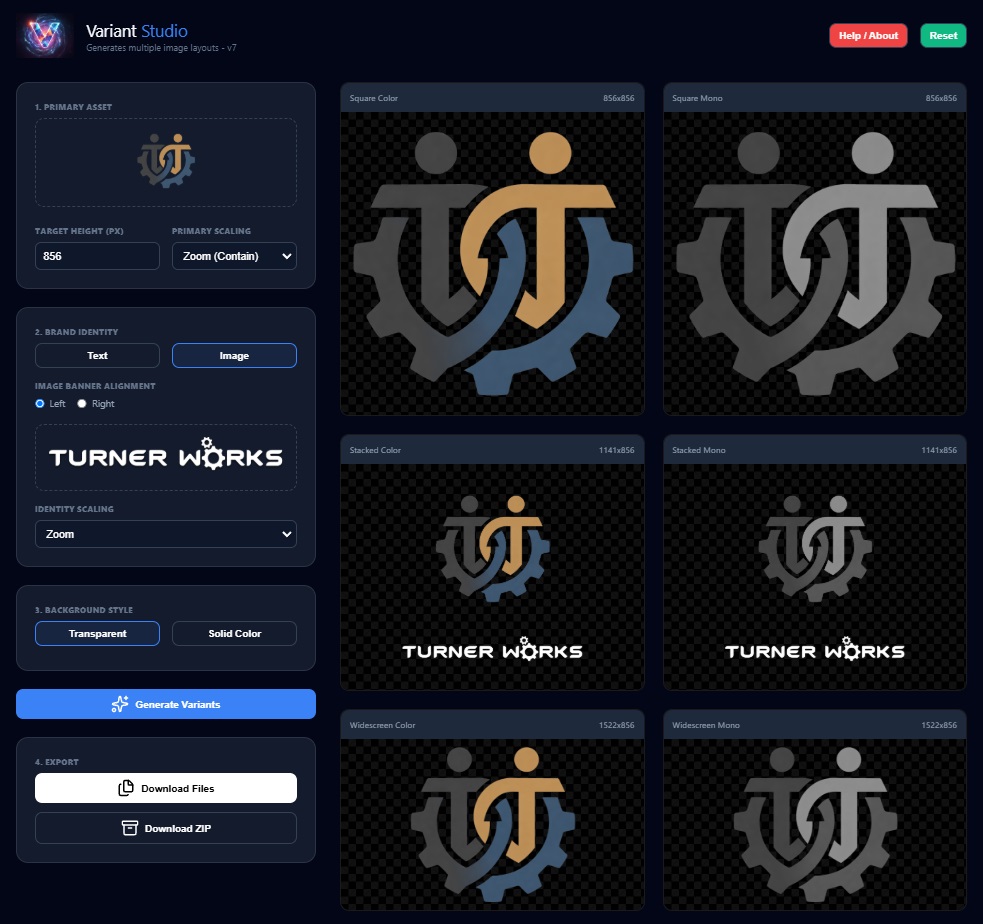
Variant Studio transforms a single logo or image into a comprehensive suite of layout variants. By automating aspect-ratio adjustments and monochrome conversions, it eliminates the repetitive manual labor of brand asset preparation.
Every designer knows the "Export Loop." You finish a logo, and then you spend thirty minutes creating the square version, the widescreen version, the banner version, the black-and-white version, and the inverted version. It’s a bottleneck in the creative workflow.
Variant Studio was built to solve this. Using the HTML5 Canvas API, it acts as a "one-click" tool that handles the scaling, positioning, and color-processing of your core assets.
🚀 The "One-to-Many" Logic
The core philosophy of Variant Studio is Parameter Design makes tweaking settings a breeze with instant visual feedback.
Smart Layouts Included:
- The Square (1:1): Optimized for profile pictures and app icons.
- The Stacked (4:3): A classic vertical lockup with the logo sitting proud above the text.
- The Widescreen (16:9): Perfect for presentation slides and video watermarks.
- The Banner (12:2): A horizontal strip designed for headers and email signatures.
Image Scaling
You can customize how your asset interacts with the new dimensions to ensure the composition remains professional:
- Zoom (Contain): Ensures the entire logo is visible within the frame without clipping.
- Fill (Cover): Bleeds the asset to the edges, ideal for creating texture-style backgrounds.
- Stretch: A utility option for specific UI needs where aspect ratio is less critical.
- None: Keeps the asset at its native resolution for pixel-perfect clarity.
Technical Features
Live Monochrome Processing
To create the "Mono" variants, the engine performs a per-pixel grayscale conversion in real-time. This ensures that your brand identity works in high-contrast environments or black-and-white print media without ever needing to open Photoshop or Illustrator.
Batch Exporting
Once the variants are generated, Variant Studio utilizes JSZip to bundle the entire pack.
- Preview: View results on a transparency grid to check alpha channels.
- Granular Control: Download individual files for quick edits.
- The Brand Kit: Grab the entire processed suite as a single compressed folder in one click.
Summary
Variant Studio is an essential utility for designers and developers who need to turn a single design into a versatile asset library. By automating the "boring" parts of the export process, it allows you to focus on the creative work while the tool handles the math and the monochrome.
Project Reference
This article relates to a project in our portfolio.